
Shadow boxing app for feedback on your rounds
Film a short shadowboxing round. Get timestamped notes on your stance, guard and footwork, plus a drill to practise between classes.
Review the habits you repeat at home
A shadow boxing app is useful when it helps you notice a habit before you repeat it for another week. You may feel balanced while your feet cross after a combination. You may feel protected while your lead hand stays low after the jab. Recording the round lets you examine those details.
MMA GPT reviews the technique visible in your own video. It connects feedback to moments you can replay and gives you drills to work on. Use those notes as homework between classes. Your coach can check whether the correction fits your stance, experience and current training goals.
Keep the purpose of solo practice clear. Shadowboxing develops movement and rehearses combinations. It cannot establish punch power, prove that a defense works against contact or replace partner timing. A useful review tells you what is visible and gives you a manageable next step.
How to film a shadowboxing clip
Choose one combination
Record 20 to 60 seconds of a familiar sequence, such as jab, cross and an exit step. Work at a controlled pace. Leave enough time between repetitions to reset your hands and feet. Reviewing one sequence makes it easier to see whether a mistake repeats.
Keep your feet and hands visible
Place your phone on a stable support with the full body in frame. Use good lighting and enough space to move without leaving the shot. A side or diagonal view can reveal balance and hand return. Avoid filming toward a bright window that hides your stance.
Upload after the round
Open the app in your phone browser, choose boxing and upload the clip. Read the first correction, replay its timestamp and check it against the video. If the action is obscured, film a clearer angle. You do not need to record a harder or longer round to get useful footage.
Use the free boxing round timer to keep practice consistent. The shadow boxing workout routine gives you a structure for the rest of the session.
From a timestamp to your next drill
Inside the sample boxing report
- 1. Find the momentAt 0:03, the report flags the lead hand dropping after the jab. Replay that moment before changing your technique.
- 2. Train the correctionReturn the lead hand to your cheek. The sample drill, Rubber band returns, gives setup, action and reset steps.
- 3. Check the next clipFilm the same combination again. Compare hand position after each jab and ask your coach to check the correction.
This is a boxing example. Feedback on your upload depends on the sport, visible action and camera angle.
Open the sample jab analysisTry the coaching demonstration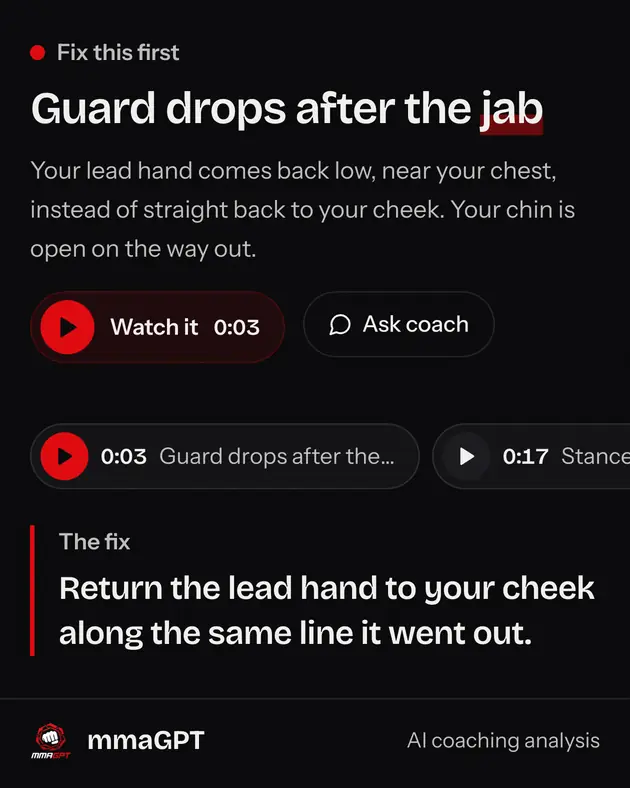
Start with one correction. If the note concerns hand return, slow the combination down and check that the hand reaches your cheek before starting again. If it concerns balance, reduce the step size and finish each repetition in a stance you can move from.
Film the same sequence after practising. Use a similar angle and pace so the comparison is useful. Look for the movement changing, rather than chasing a score. Ask your coach to confirm the change before carrying it into faster combinations or sparring.
Choose the tool for your training goal
- Use a timer to organise rounds and rest. It keeps the session moving while you concentrate on the sequence.
- Use a technique guide to learn a movement and its cues. The boxing technique library covers punches, defense and footwork.
- Use video feedback to review your own repetitions. The boxing training app also reviews bag work, pads and sparring clips.
You can combine all three. Read one technique, practise it during a timed round, then review a short clip. Keep the next session focused on the correction you can actually check. That gives your home practice a clear link to what you are learning in class.
The AI boxing coach overview explains how feedback fits alongside a human coach. Share the original clip as well as the report so your coach can assess the movement directly.
Shadow boxing app questions
- MMA GPT reviews the movement visible in your clip: stance, hand return, balance, footwork and defensive shape. It connects corrections to video timestamps and suggests practice drills. Shadowboxing cannot show impact, contact distance or reactions to an opponent. Bring the feedback to your coach and test it during supervised training.
- Yes. Film shadowboxing in a clear space with your whole body visible. Use controlled punches and keep your feet in frame. A partner or bag is unnecessary for this review. You still need coached practice to develop timing, contact and responses to another fighter, which a solo clip cannot demonstrate.
- Your first video analysis is free with no card needed. The app runs in a phone or desktop browser. The round timer is free to use separately. If you want further video reviews, check the current plans and analysis packs on the pricing page before deciding how often to upload.
- Yes. Open mmagpt.app in your browser and upload the video from your phone. There is no native download required. Put your phone on a stable support when filming, then upload after the round. You can also use a desktop browser if you prefer reviewing the report on a larger screen.
Record one sequence and review it
Your first analysis is free, no card needed. After that, plans start at $9 a month. See video analysis pricing for current plans.